Charged, pending or still Free
AI Subscription Payment Troubleshooting for ChatGPT, Grok, Claude and Gemini
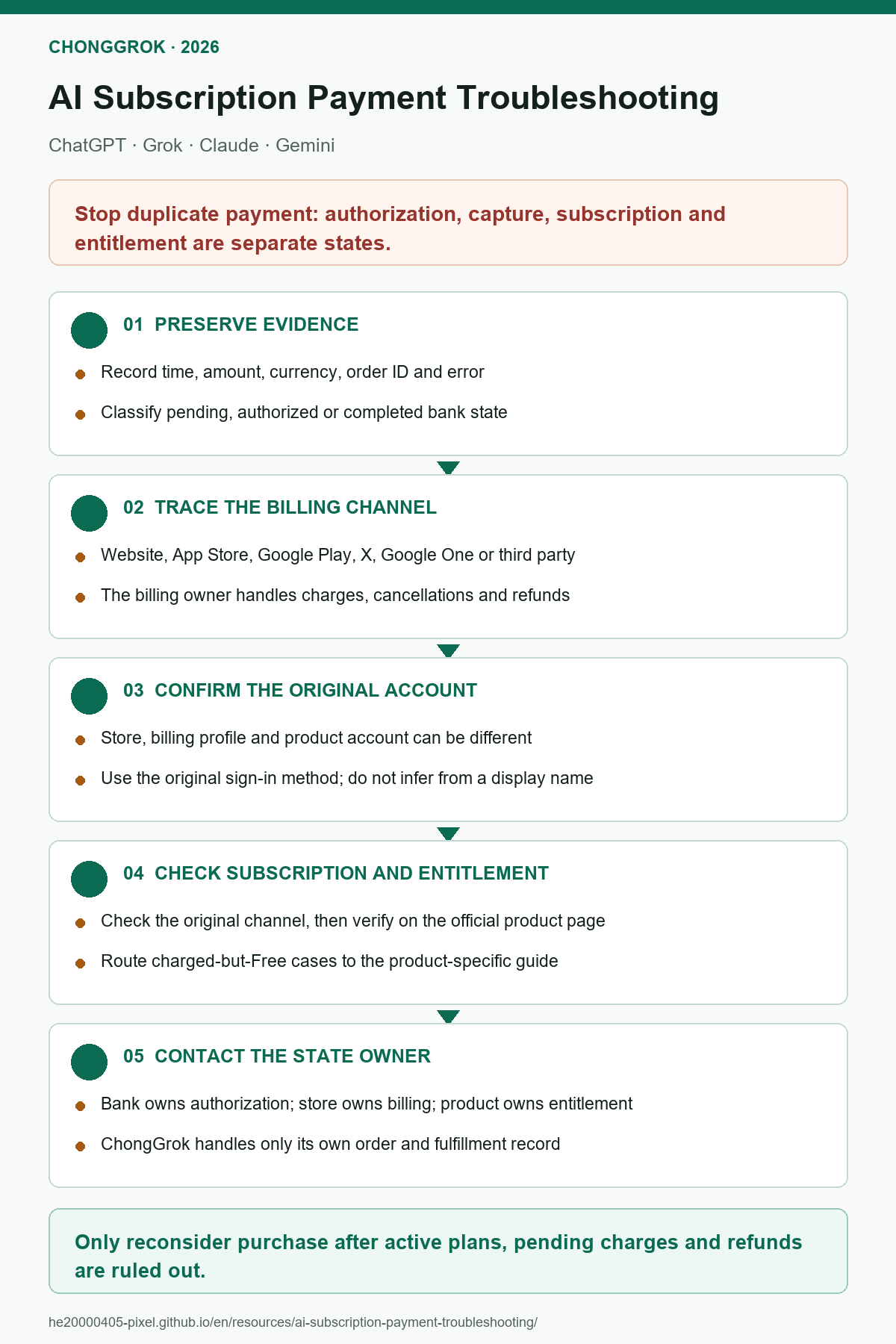
Start with the bank transaction, then verify the billing channel, subscription and product account. Each step identifies one state so you do not create a duplicate order while the first one is unresolved.
Prepare these six details
- Product, plan and billing term;
- exact payment time, amount and currency;
- the status shown by the bank;
- receipt sender and order ID;
- product account and sign-in method used at purchase;
- the plan or error currently shown by the official product.
Redact full email addresses, order numbers, card details, session credentials, User IDs, verification codes and recovery data in screenshots. If any channel already shows an active plan, completed charge or pending transaction, stop before creating another order.
First decision: what state do you actually have?
| What you see | What it means | Next action |
|---|---|---|
Bank shows pending |
The transaction is still being processed; the provider may not have received final payment | Keep the record and wait for a final outcome; do not pay again |
| Bank shows complete but there is no receipt | Money may have left the account, but the billing provider and order are not confirmed | Use the time and merchant name to ask the bank and possible billing provider |
| Formal receipt received | The billing provider recorded the transaction | Open the original billing channel and inspect the subscription and account |
| Subscription is active but the product shows Free | Billing exists; the remaining problem is account ownership or paid-access recognition | Confirm the original product account and use the product-specific guide |
Complete troubleshooting sequence
- Determine whether the charge is final.Open the bank transaction and receipt. Treat `pending` as an unresolved bank transaction, not proof that the provider was paid. Record the receipt sender when a completed receipt exists.
- Identify the original billing channel.Use the receipt to classify the order as product website, Apple, Google Play, X, Google One or ChongGrok. This channel controls the subscription record.
- Inspect the subscription in that channel.Sign in with the account shown on the receipt and look for active, cancelled-but-still-valid, pending, failed or refunded. Stop checking other stores once an active or pending plan is found.
- Confirm the product account used at purchase.Compare the current email and sign-in method with the original purchase. The store account pays; the product account receives access. They are different identities.
- Verify access on the official product page.Open Plan, Billing, Subscription or account settings. The process is complete only when the intended plan appears on the correct account.
- Contact the owner of the first incomplete state.The bank handles card states; the billing channel manages the subscription; the product provider handles a completed payment with missing access; ChongGrok handles only ChongGrok orders.
Troubleshoot by billing channel
Product website
Where: sign in with the purchasing product account and open Billing, Plan or Subscription.
Action: compare the plan, expiry date, receipt and masked account identifier.
Expected result: the page clearly shows active, expired, failed or pending.
If it differs from the app: update the app and sign in again with the original account. Save both screens and contact product support if the website is active but the app still shows Free. Do not buy a store subscription.
Apple App Store
Where: iPhone or iPad Settings → Apple Account → Subscriptions.
Action: use the Apple ID from the receipt, find the product and then sign in to the app with the product account used at purchase.
Expected result: Apple and the product app show the same active plan.
If they differ: save the Apple receipt and product-account screen. For a ChatGPT subscription bought through the Apple App Store, OpenAI documents Settings → Account → Restore purchases in the ChatGPT iOS app. Do not generalize that control to Grok, Claude or Gemini.
Google Play
Where: Google Play → original Google account → Payments & subscriptions → Subscriptions.
Action: check the product, order state and renewal date, then return to the app with the product account used at purchase.
Expected result: Play and the product account show the same active plan.
If they differ: first confirm that Google Play is using the Google account that paid for the subscription, then confirm that the product app is signed in to the account used at purchase. OpenAI does not currently document an Android control equivalent to the iOS Restore purchases path. If ChatGPT still shows Free, save the Play receipt, subscription screen and ChatGPT account screen, then contact OpenAI Support. Use a restore control for other products only when their provider documents it.
Refund boundary: Google Play provides the store subscription record and cancellation entry, but refund ownership differs by product. xAI currently directs SuperGrok Google Play refunds to xAI. Follow the current official guidance for ChatGPT, Claude or Gemini instead of assuming one refund route covers every product.
X Premium+ or Google One
For X Premium+, confirm which X account owns the plan, then verify the same X account is connected in Grok Settings. X billing problems belong to X Support.
For Google AI plans, confirm the personal Google account in Google One and the account shown in Gemini. Use Google One, Google Payments or the original store as directed by the live billing page.
ChongGrok order
Use the original order, card key or support record. Existing ChatGPT card-key orders can continue through the verification page. For assisted orders, provide the original order ID and a redacted product-account state to the original support channel.
Stop while the order is still processing. Never post a session credential, User ID, card key or full order details publicly.
Product-specific routes
| Product | Payment failed | Charged but not active | Renewal or downgrade |
|---|---|---|---|
| ChatGPT | Card and authentication errors | Paid but still Free | Renewal failed |
| Grok | SuperGrok payment errors | Paid but still Free | Check the original channel and subscription route |
| Claude | Card decline and 3DS | Paid but still Free | Renewal failed or downgraded |
| Gemini | Card and billing profile errors | Paid but plan is missing | Renewal failed or downgraded |
Contact the provider responsible for the failed state
| Failed state | Primary contact | Evidence to provide |
|---|---|---|
| Card payment is pending, declined or restricted | Issuing bank | Time, amount, merchant and bank status |
| Apple subscription, charge, cancellation or refund | Apple Support | Apple receipt, order ID and subscription screen |
| Google Play subscription state or cancellation | Google Play | Play order ID, Google account and subscription screen |
| Google Play refund request | Check the specific product’s official refund instructions first | OpenAI currently handles ChatGPT requests through its Help Center; xAI handles SuperGrok requests through its refund form |
| X Premium+ billing | X Support | X account, receipt and plan state |
| Google One or Google Payments billing | Google Support | Google account, plan and payment record |
| Completed receipt but original product account lacks access | Relevant AI product provider | Receipt, subscription screen, account and error page |
| ChongGrok order or fulfillment state | ChongGrok Support | Original order ID, payment time and redacted account state |
Completion checklist
- The original billing channel and channel account are known.
- The transaction has a clear pending, failed, refunded or completed state.
- The purchasing product account and sign-in method are known.
- The official product page shows the plan, or the correct provider has the redacted evidence.
- No duplicate subscription was created while the first state remained unresolved.
Consider a new purchase only after the old state is closed
Re-evaluate purchase options only after confirming that no active subscription, pending charge, pending refund or unresolved ChongGrok order exists. If a user needs a domestic payment route, ChongGrok has separate pages for ChatGPT, SuperGrok, Claude and Gemini.
Gemini own-account assistance and the separate ready-made annual account are different fulfillment paths. Choose only after the old billing state is closed.
Frequently asked questions
Should I pay again if an AI subscription was charged but the account still shows Free?
No. First determine whether the charge is pending or complete, identify the original billing channel and purchasing account, and check paid access on the official product page.
Can I use Restore purchases on both iOS and Android?
No. OpenAI currently documents Restore purchases for ChatGPT subscriptions bought through the Apple App Store, using the ChatGPT iOS app. On Android, verify the original Google Play account, the Play subscription and the ChatGPT account used at purchase; do not assume the same button exists without official documentation.
Does a receipt prove that the current AI account has the paid plan?
No. A receipt proves that a billing provider recorded a transaction. The subscription must still be associated with the correct product account and recognized on the official product page.
Who handles a Google Play refund?
The route depends on the product. xAI currently directs SuperGrok Google Play refund requests to xAI, while ChatGPT, Claude and Gemini users should follow their product provider's current refund guidance and the live Google Play process.
Official references
- OpenAI: avoid duplicate subscriptions across web, iOS and Android
- OpenAI: subscription associated with another ChatGPT account
- OpenAI: restore an Apple App Store purchase
- OpenAI: request a ChatGPT refund
- xAI: Grok consumer FAQ
- Anthropic: paid plan billing FAQs
- Google: manage a Google AI plan from Gemini
- Google Play: manage subscriptions
- Apple: cancel an Apple subscription
Independence and risk disclosure
ChongGrok is an independent membership-assistance service and is not affiliated with, authorized by or officially partnered with OpenAI, xAI, X, Anthropic, Google or Apple. Plans, prices, limits, regional availability, refunds and recovery outcomes are controlled by the relevant providers. No online service is risk-free, and this guide does not replace a bank, billing provider or product provider’s decision on a specific order.
Save or share: the decision graphic is useful for a quick check. This HTML page contains the complete branches, support boundaries and current corrections.
Download A4 PDF